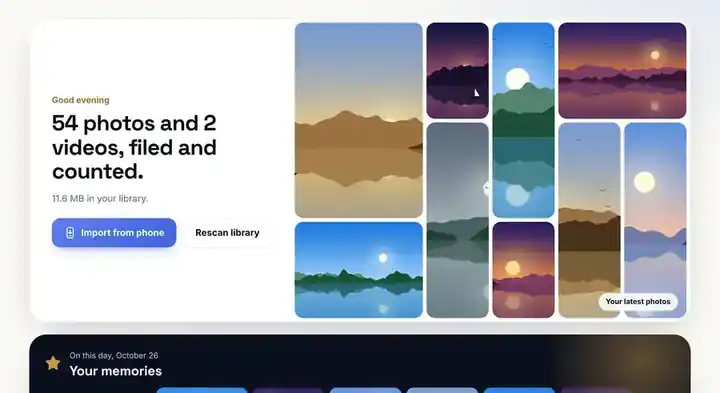
See your whole library
Photos and videos per year, memories from this day, cameras and how full each drive is.
PhotoVault files every photo and video by year and month, removes duplicates and blurry shots, and frees up space on your PC.
Works with Android phones, iPhones and every digital camera. Your photos never leave your computer.
Copy from any device to your laptop and PhotoVault reads the date each photo was taken, whatever took it.
Three steps and about two minutes of your time. PhotoVault does the sorting.
Connect it with your charging cable. PhotoVault spots the phone, an SD card or a camera, and counts the photos that aren't on your PC yet.
 PhotoVault–□✕

Before anything moves, you see every folder with the photos going into it. Trips and festival days are found automatically and named for you.
PhotoVault–□✕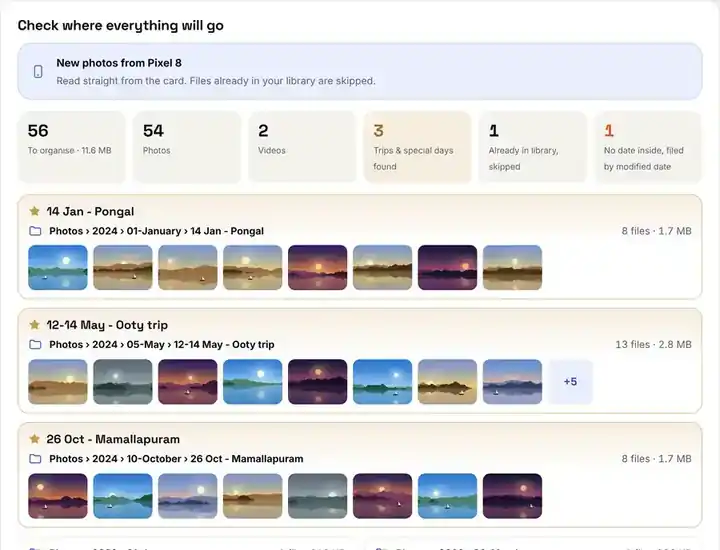
Year, month, and a folder for every trip and special day. Screenshots, WhatsApp and documents get their own places, and the junk goes to the Recycle Bin.




 Screenshot
 Copy
 WhatsApp
 Blurry

 Too dark
 Video



 WhatsApp
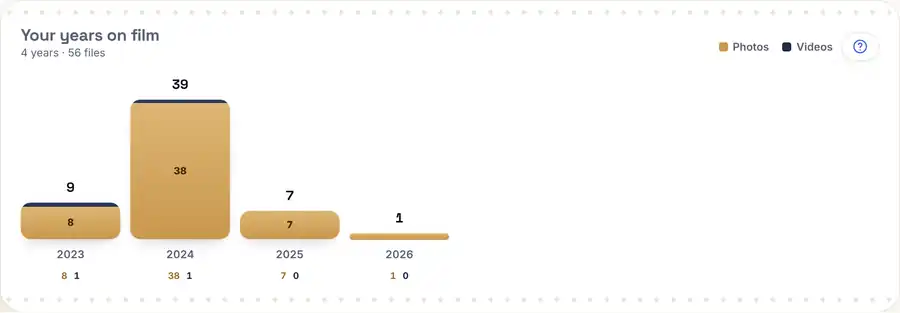
The dashboard shows photos taken on this day in earlier years, with the place or trip, and how your library has grown year by year.
PhotoVault–□✕ PhotoVault–□✕
Copy your phone's photos to your laptop. PhotoVault reads the date each photo was taken, files it by year and month, finds duplicate photos and sorts your PDFs too.
Photos and videos per year, memories from this day, cameras and how full each drive is.
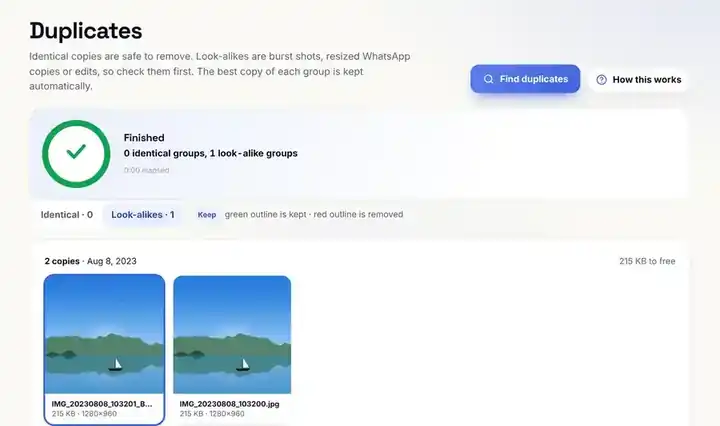
Exact copies and look-alikes like WhatsApp re-saves and burst shots. The best copy is kept automatically.
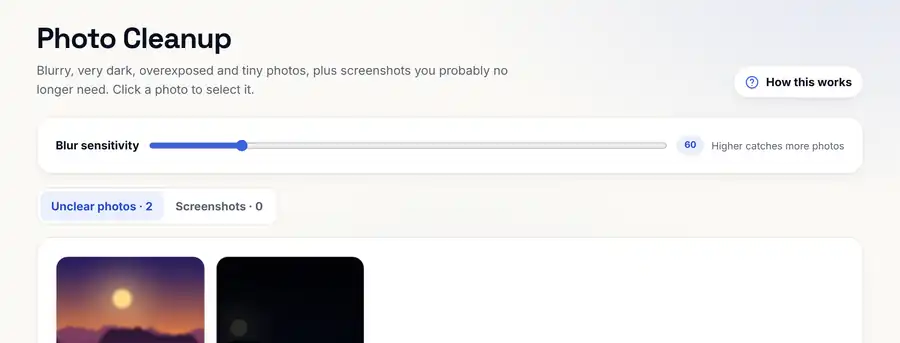
Blurry, too-dark and tiny photos and old screenshots, gathered for one quick review.
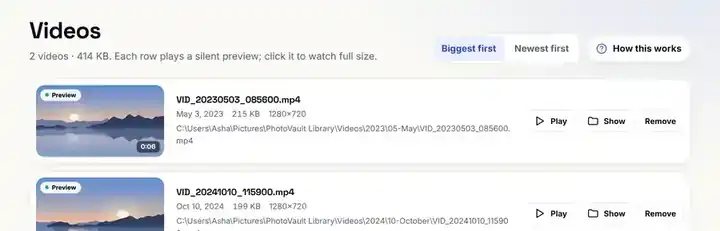
Every video plays a silent preview right in the list. Biggest first, so space is easy to win back.
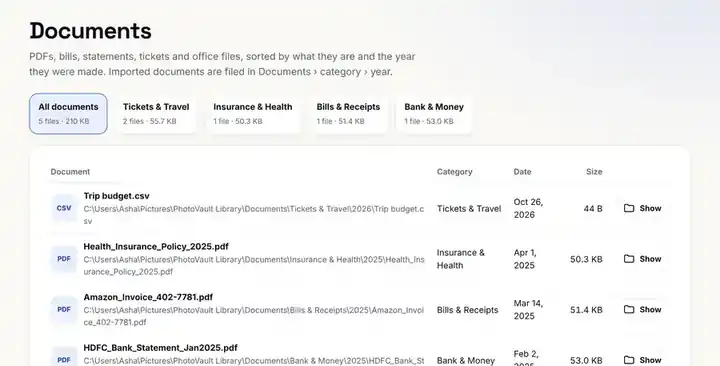
Bills, bank statements, tickets and certificates filed by type and year.
Pick a folder and get a reel of your best shots, plus App Uninstaller, People and Faces and Smart Search as they launch.
Copy your phone's DCIM and WhatsApp folders to your laptop, open PhotoVault, choose that folder and press Preview. You'll see every year and month folder with the photos that will go into it. Press Organise and PhotoVault files everything; Undo puts it all back if you change your mind.
Yes. Plug your phone into the laptop with its USB cable (Android: choose File transfer; iPhone: tap Trust). PhotoVault spots it, counts the photos and videos that aren't in your library yet, and imports only those after you check the preview. SD cards and cameras work the same way.
Open Duplicates and press Find duplicates. PhotoVault finds exact copies and photos that look the same, such as WhatsApp re-saves and burst shots, and keeps the best copy. Removed photos go to the Recycle Bin, so nothing is lost by mistake.
Yes. Organising, duplicates, blurry photo cleanup, videos, documents and temp file cleaning are free with no time limit. Pro adds the AI Reel Maker and more, with a 7-day free trial.
No. PhotoVault runs entirely on your Windows PC. Your photos, videos, documents and file names never leave your computer.
Yes. WhatsApp images and videos go into their own WhatsApp folder and screenshots into a Screenshots folder, each by year, so your camera photos stay clean.
Yes. Smart event folders group trips and busy days into named folders inside the month, such as 12-14 May - Ooty trip, 25 Oct - Mamallapuram or 14 Jan - Pongal. Place names come from the GPS position saved in your phone photos and are looked up offline on your PC.
Yes. Bills, bank statements, tickets, certificates, ID scans and office files are sorted into Documents by category and year, using the names and dates inside the files.
Windows 10 and Windows 11, 64-bit. Download the installer, run it, and PhotoVault appears in your Start menu. No admin rights are needed, and updates install with one click.
Free plan with no time limit; try Pro free for 7 days inside the app.
PhotoVault SetupInstalling…12-14 May - Ooty tripPhotoVault–□✕Recommended: installs in one click and updates itself. Or get the direct installer by email.